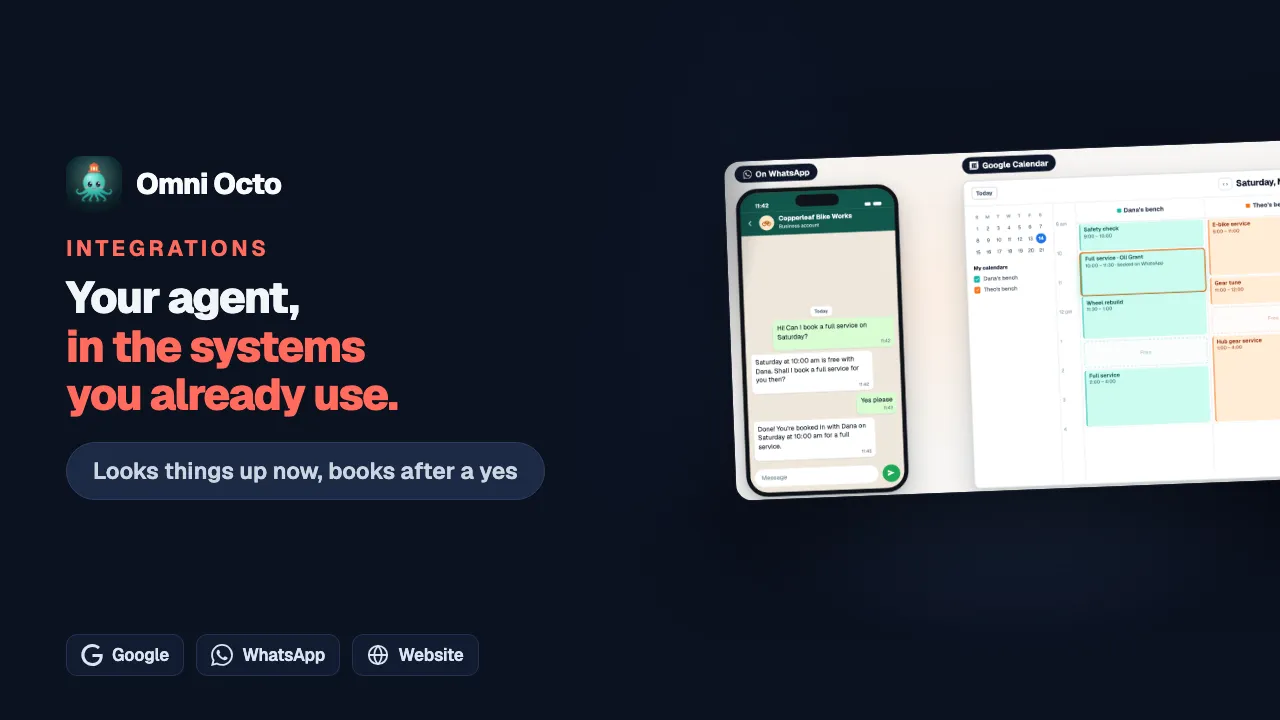
A tool that looks something up runs as soon as the agent needs it. A tool that makes a change, such as adding an event to a calendar or a row to a sheet, does not. The agent first says what it is about to do, and the change waits for the customer’s yes.
Copperleaf Bike Works is a fictional bike repair shop. Its front-desk agent, Copperleaf Front Desk, has four tools. Look up a repair, on its workshop system, and Suggest time, on Google Calendar, only read. Create event, which books a service into Google Calendar, and Add a parts request make changes. This guide follows Create event through each channel.
Which tools ask first
On the agent’s Integrations tab, every tool row has a label:
| Label | What happens on a customer’s turn |
|---|---|
| Looks things up | It runs right away |
| Asks the customer first | The agent asks, and the change waits for a yes |
| Acts right away | It runs without asking. Only a tool from an app or MCP server can be set this way |
A tool you made yourself that Makes changes always asks first. Its Safety and availability section says so under Confirmation:
“The agent reads these details back to the customer in the customer’s language and only goes ahead after the customer says yes.”
How the agent asks
When the customer has given everything the tool needs, the agent calls it. On a tool that makes changes, that call only proposes the change. Nothing is sent yet. The agent then asks one short yes-or-no question in the customer’s language, saying in everyday words what it will do and where. For example: “Saturday at 10 am is free on Dana’s bench. Shall I book you in for a full service then?” It does not mention tool names, IDs or the word “confirm”.
The change is frozen exactly as proposed. The yes sends that change and nothing else.
On website chat: Confirm or Change
Under the agent’s question, website chat shows two buttons: Confirm and Change. The customer can also just type a reply.
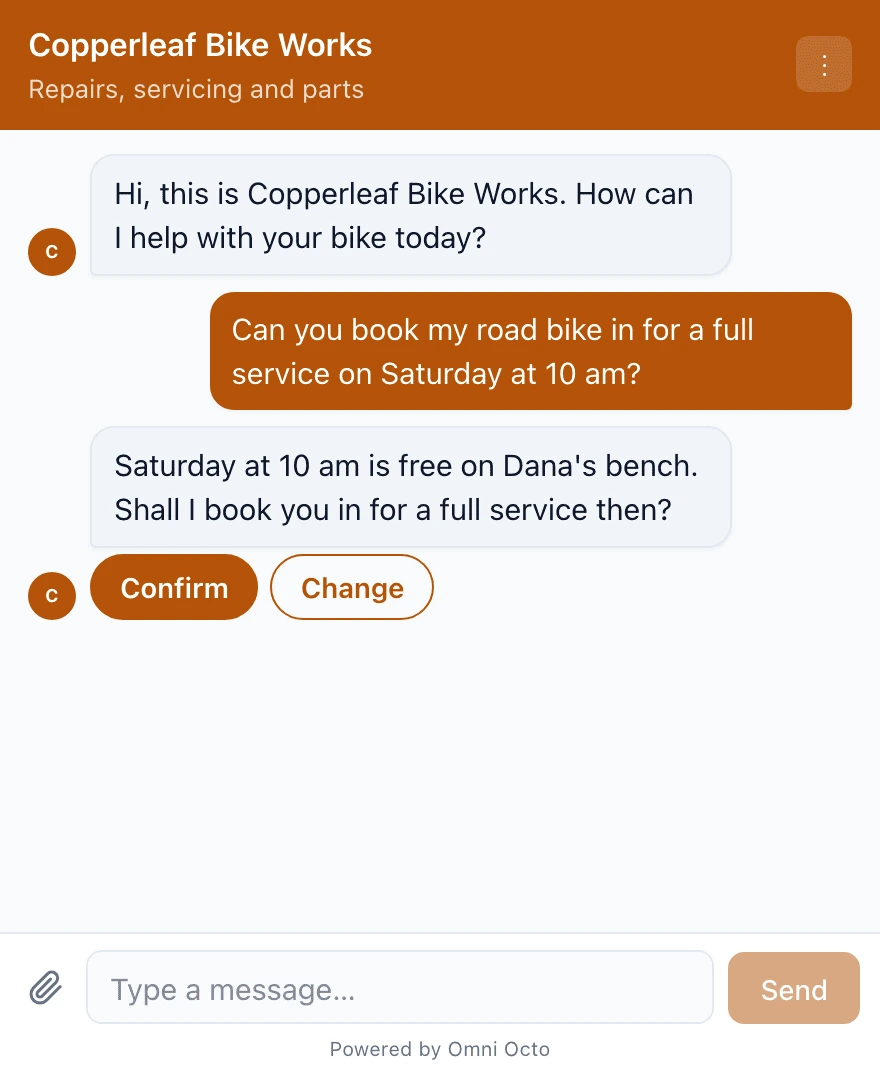
Pressing Confirm disables both buttons and shows “Working on it…”. Then the card shows what happened. Done and Didn’t go through appear next to Confirmed:
| The card says | What it means |
|---|---|
| Done | The change was made. If the tool has a Website chat status text for Done, the card shows that instead |
| Didn’t go through | The other system refused it or failed. Nothing was done |
| No answer from the system yet | The other system did not answer in time. It may or may not have happened |
| Cancelled | The customer pressed Change, or said no |
| No longer available | The change waited too long, see below |
| Replaced by a newer request | The agent proposed a different change after this one |
The card never shows the tool’s name, its inputs or the raw result. Only the outcome.
On WhatsApp, SMS, email and other messaging: reply yes
These channels have no buttons. The customer replies in their own words. The agent decides the reply is a yes, and then our server checks it again before anything is sent.
A plain agreement counts: “yes”, “ok please book it”, “sounds good”, “好的”, “はい、お願いします”, 👍. These are not taken as a yes, and the agent answers or asks again instead:
- a question: “ok?”, “is that ok”, “what will it cost?”
- hesitation: “hmm, wait”, “let me think”
- a change: “yes but at 4”, “ok 3” when two bikes were proposed
- a condition: “ok if it’s free”
The check works the same in English, Chinese, Japanese, Korean, Spanish, Portuguese, French, German, Malay, Indonesian, Vietnamese and Thai. When a reply is not clearly one or the other, a separate small AI check reads it beside the proposal. If that check fails for any reason, the answer counts as not clear, and the customer is asked again. Nothing is sent.
Two more rules keep a yes honest:
- The yes must be new. It has to come in a message after the question. Something the customer wrote before the agent asked never counts.
- The yes must be the latest word. If the customer writes “yes” and then “actually, wait”, the “yes” no longer counts.
On email, only the customer’s own reply is read, not the quoted text below it. So the agent’s own “Shall I go ahead?” quoted under the reply is never taken as the customer’s words.
On calls: the read-back
On a call, the agent reads the details back aloud, with numbers, dates and times said so they are easy to hear. It goes ahead only when the caller clearly says yes in their next turn. A question back, a hesitation, or anything unclear is not a yes. The agent answers it and asks again.
The tool’s Use on setting says the same:
“On calls, the agent reads the details back and the caller says yes before anything changes.”
The caller’s yes must come after the agent has read the details back. If the read-back was cut off and the caller never heard it, the agent asks again before anything counts. Words heard while the call is still in a phone menu never count as a yes.
When the customer says no, or changes the details
A no cancels the change. Nothing is sent. On website chat, Change does the same, and the agent asks what the customer would like to change.
A change to the details also cancels the old proposal. Say the customer answers “Can we do 2 pm instead?”. The agent proposes the new time and asks again, and the customer says yes to the new one. A yes always applies to the latest proposal: one conversation has only one change waiting at a time, and a new proposal replaces the open one. On website chat the old card then reads Replaced by a newer request.
Some things stop a change between the question and the yes. Then nothing is sent:
| What happened | What the agent does |
|---|---|
| The tool, or its integration’s settings, changed | Proposes the change again, if the customer still wants it |
| The integration was turned off, or its key stopped working | Tells the customer it can’t be done right now |
| The change was already made | Does not make it twice. It gives the result it already has |
The last row matters. If the agent tries to make the very same change again before the customer has written anything new, it is not sent a second time.
How long a change waits
A proposed change waits for the customer’s answer for a set time, which depends on the channel:
| Channel | Waits for |
|---|---|
| Website chat (and the agent’s test chat) | 10 minutes |
| Calls | 10 minutes |
| WhatsApp, SMS and other messaging | 1 hour |
| 48 hours |
After that, the change expires and nothing is sent. On website chat the card reads No longer available. If the customer says yes later, the agent asks again from the start, and the customer confirms the new question.
Ask the customer first, or act right away
A tool from an app you signed in to, or from an MCP server, has an Ask the customer first switch. You set it when you pick the integration’s tools (Choose tools), and change it later on the tool, under Safety and availability. The switch belongs to the tool, so it applies to every agent that has the tool.
New tools start like this:
“A tool that may change things asks the customer first; one that only looks things up runs without asking. You can change both for each tool.”
| Switch | What it says |
|---|---|
| On | ”The agent tells the customer what it will do and goes ahead only after they say yes.” |
| Off, tool only looks things up | ”This tool only looks things up, so the agent runs it without asking.” |
| Off, tool may change things | ”The agent runs this tool as soon as it decides to, without asking the customer.” |
Turning it off for a tool that may change things shows a warning: “This tool may change things in Copperleaf parts. The agent will run it without asking the customer.” On the agent’s Integrations tab, that tool’s label becomes Acts right away.
A tool that acts right away still follows every other rule here: it is never sent twice for the same request, and it counts toward the limit below.
A tool you build yourself, as a request to your own API, has no such switch. If it makes changes, it always asks.
How many changes one conversation can make
| Limit | How many |
|---|---|
| Changes made in one conversation | 5 |
| Tool calls in one conversation, lookups and changes together | 30 |
| Tool calls for one customer, per hour | 60 |
| Tool calls for one agent, per hour | 600 |
| Tool calls in the workspace, per hour | 3,000 |
| Calls running at the same time to one integration | 10 |
The five changes are counted from the start of the conversation and never reset, even on a WhatsApp thread that runs for weeks. Only a change that is really sent counts. A no, a refused yes, an expired proposal and a change the test chat does not really send do not use one up. A tool that acts right away uses one each time it runs.
When the five are used, the agent tells the customer plainly that the change can’t be made in this conversation. Nothing is sent.
After the yes
The agent tells the customer the result in its own words. If the other system refused the change, it says it tried and the system couldn’t do it, without guessing why. If the system did not answer in time, it says it can’t tell yet whether the change went through, and it does not offer to do it again: a second try could make it twice. Those changes are flagged for you.
To see each step afterwards, see what a tool did. For a change whose result is unknown, see when an integration needs you.
Before customers reach the agent, test the tools safely.