Bayside Express Car Wash has a new offer for its regulars: Unlimited Wash Club, first month $19.99. The text goes to the Weekend Regulars list, 1,240 people, and it carries one link: the Club sign-up page. The question the owner wants answered on Monday is simple. How many people clicked it, and who?
This page covers three things Omni Octo does to get that number up and to make it readable:
- Tracked short links. Each person gets their own short link, so the campaign page shows who clicked and how often.
- Follow-up texts. A second campaign, with a different offer, to the people who did not click the first one.
- Replies answered by your AI agent, including the photo a customer texts back.
The first guide in this set covers building and sending the campaign itself. This one starts where that leaves off.
What you can measure, and what you can’t
There is no open rate for SMS. A text message has no read receipt, so the sender is never told whether it was read. Omni Octo does not show an open figure for texts, and a tool that shows you one is guessing.
What a text campaign can tell you:
| Signal | Where it comes from |
|---|---|
| Delivered | The carrier’s delivery receipt |
| Clicked | A click on a tracked link (only when link tracking is on) |
| Replied | A text back to the number the campaign sent from |
| Opted out | A STOP reply |
The campaign page gives the first three as a share of delivered, not of everyone you sent to, because a text that never arrived could not be clicked or answered. Clicks and replies are the numbers to work on, and the rest of this page is about both.
Turn on link tracking
Open the campaign draft in the editor (/campaigns, then the draft). Under Message text there is a checkbox:
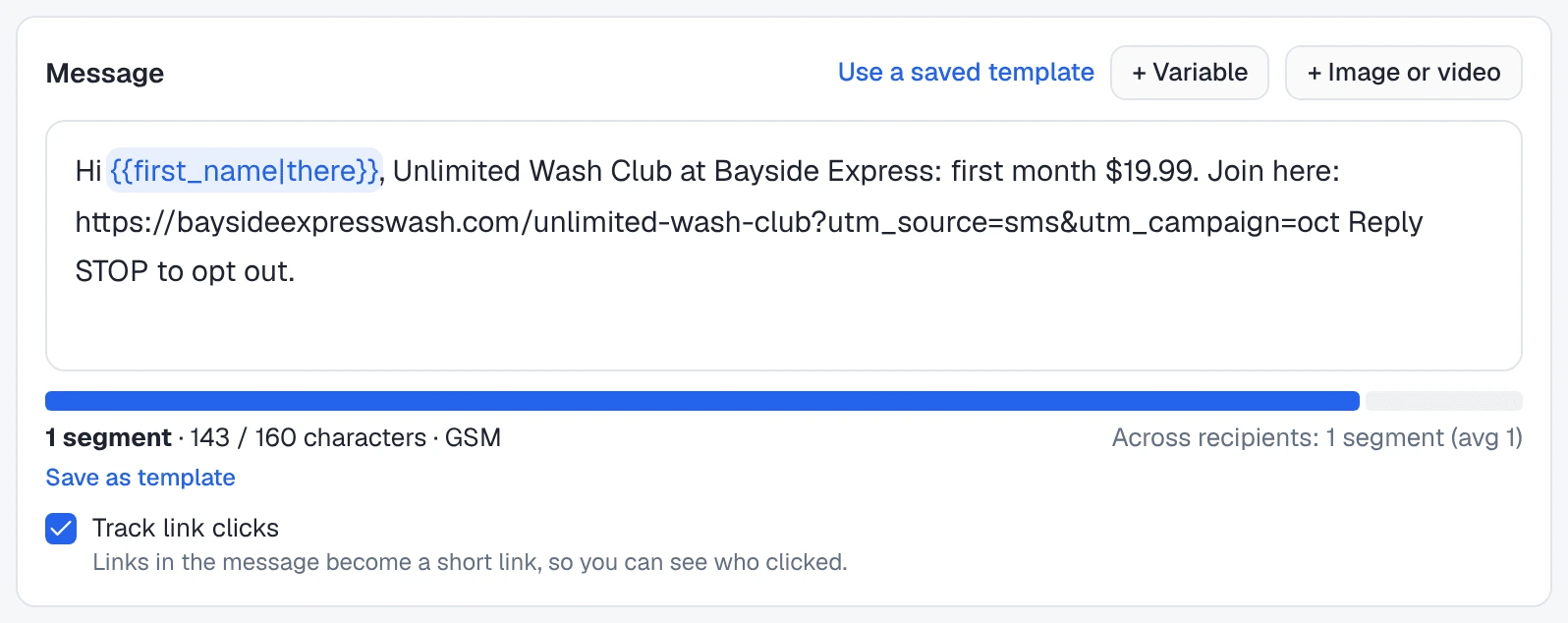
Track link clicks Links in the message become a short link, so you can see who clicked.
It is off for every new campaign, so tick it whenever the text has a link in it. If you build the campaign with Octo, ask for it in the same sentence: “…and track the link clicks.” Octo sets the same option on the draft.
When it is on, every link you typed into the message is replaced, at send time, by a short link on Omni Octo’s own link domain, one per person:
https://go.omniocto.com/r/tl-3f09b1c2d4Somebody who clicks it is sent straight on to your page. Because each recipient has their own link, the click is recorded against that person, not just against the campaign.
A few rules decide which links are tracked:
- Write the link out in full, with
https://. The link has to start withhttp://orhttps://to be recognised.baysideexpresswash.com/clubon its own goes out exactly as typed, and is not tracked. - Up to three links per message. A fourth link goes out as typed.
- Only links you wrote. A link that comes out of a contact field through a variable is never rewritten. It is delivered as it is.
- Not on this server yet. If link tracking has not been set up on the server you use, the checkbox says so: “Link tracking isn’t available on this server yet, so links go out as typed and clicks aren’t counted.”
Do not put a public link shortener in the text instead. Carriers filter messages, and their error for it reads “Carrier filtered the message, usually its content or link”. The tracked link is your own short link already.
What the short link does to the length
Every tracked link is the same length, 39 characters, whatever it replaces. The segment count in the editor and in Review and send is worked out with the short link in place, so what you see is what is billed.
For a long link full of tracking parameters, that is a saving. Bayside’s text, with the sign-up page as its marketing team wrote it:
| Characters | Segments | |
|---|---|---|
With https://baysideexpresswash.com/unlimited-wash-club?utm_source=sms&utm_campaign=oct | 186 | 2 |
| With the tracked short link | 143 | 1 |
At 2 credits per segment on an Omni Octo number, that is the difference between about 4,960 and about 2,480 credits for 1,240 people. A link that is already short gets a little longer, so check the ruler after you tick the box.
What counts as a click
Phones, carriers and messaging apps open links on their own to build previews and to scan for spam. Those fetches are not people, so they are not counted:
- A click in a phone’s browser counts at once. Clicking seconds after the text arrives is the normal way people use a link, and it is counted.
- Preview and scanning services never count, and an unrecognised client that opens the link within two minutes of the send is held back as a likely scanner.
- Repeat clicks within 30 minutes are one visit. One click often produces several requests, so a person who opens the link twice inside half an hour shows one click, not two. Whether they clicked is never affected.
- Test texts do not count. A Send a test to me first text is left out of the report.
Where the clicks show up
Open the finished campaign from /campaigns. Three places show clicks.
The Engagement line, under the Delivery panel:
Engagement (of 1,180 delivered): Replied 64 (5.4%) · Clicked 142 (12.0%) · Opted out 9
Clicked is the number of people who clicked at least once. It appears only on a campaign that had link tracking on.

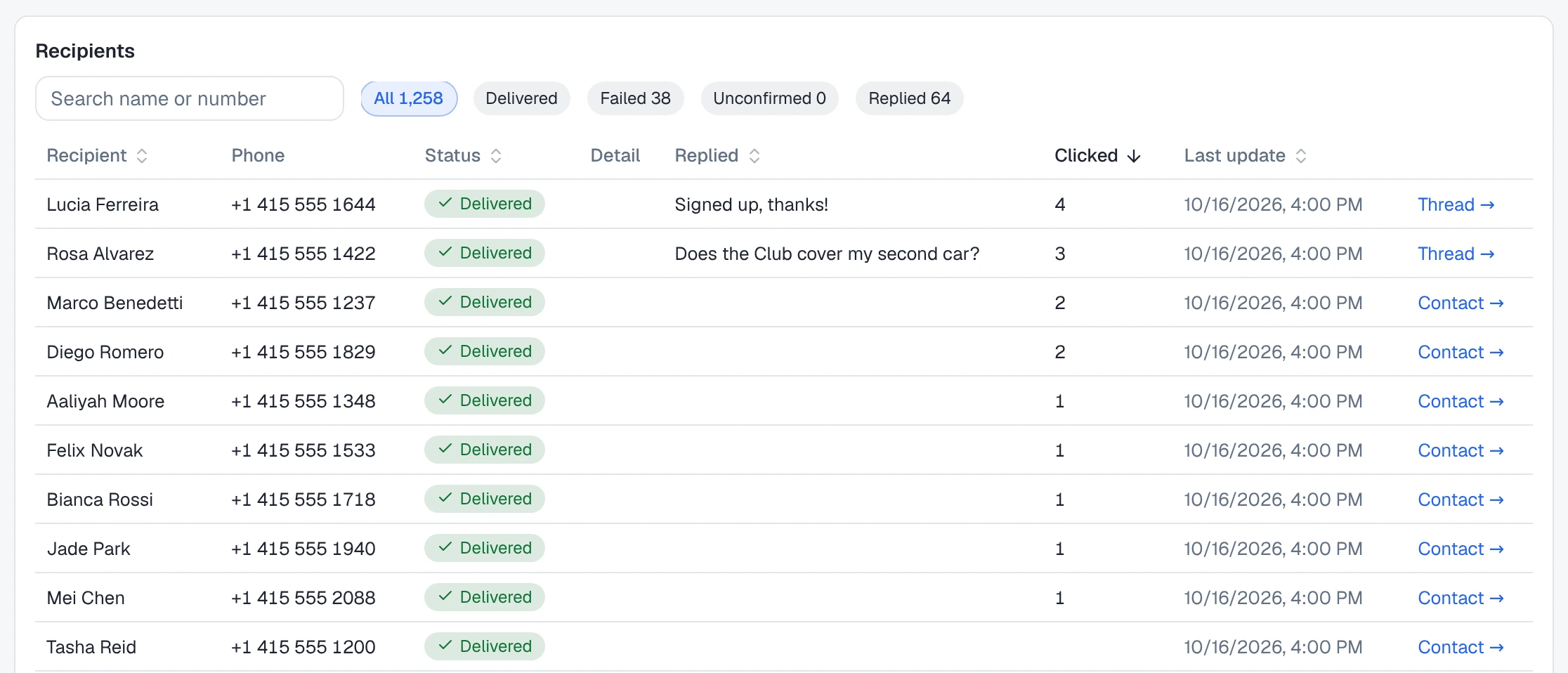
The Recipients table. It has a Clicked column with each person’s count of visits, blank for nobody. Click the Clicked header to put the most clicks on top. Click it again to reverse the order, so the people with no clicks come first. A third click goes back to Send order. On a phone, the same choices are under Sort by. Each row links to the person’s Thread → and Contact →.
The report. Download report exports one row per recipient as a CSV file
(while the campaign is still sending, the button reads Download current
report). The columns you need for this page are phone, contact_name,
status, replied_at, clicks and opted_out.
Clicks keep arriving after the campaign finishes, because people open texts late. The report shows what was true when you downloaded it.
Get more people to click
None of these are tricks. They are what the product lets you control.
- One link, one action. Tracking counts up to three links, but one clear link is the one people click. Say what the click does: “Join here”, not just a bare address.
- Stay in one segment. A shorter text costs less, and the editor shows you the count as you type. An emoji switches the whole message to Unicode, which holds 70 characters per segment instead of 160, and the editor offers to remove it.
- Use their name.
{{first_name|there}}reads as a message to a person, and the fallback means nobody gets “Hi ,”. - Show the offer. A picture of the Club card or the price board, attached with + Image or video, turns the text into an MMS: up to 1,600 characters for 4 credits per message on an Omni Octo number. Pictures go only to +1 numbers, and the editor counts who would be skipped. A tracked link works in an MMS too.
- Send when people can act. Under Schedule, a Saturday-morning window reaches people on the day they wash the car. Outside the window, the campaign waits.
- Say how to stop. Type “Reply STOP to opt out” into the text. Nothing is added for you, and STOP works whether or not you write it.
Then compare. Two campaigns with the same audience and a different line or picture, sent a week apart, show you which one got more clicks of delivered.
Follow up with the people who didn’t click
Of 1,180 people who got Bayside’s Club text, 142 clicked. That leaves about a thousand who saw nothing they wanted. The second text should give them a different reason, “First wash free when you join this week”, and it should not go to the 142 who already looked.
Ask Octo in one sentence:
Text everyone who got the Club text but didn’t click or reply: first wash free when you join this week. Track the clicks.
Octo does it in two steps you can watch in the chat:
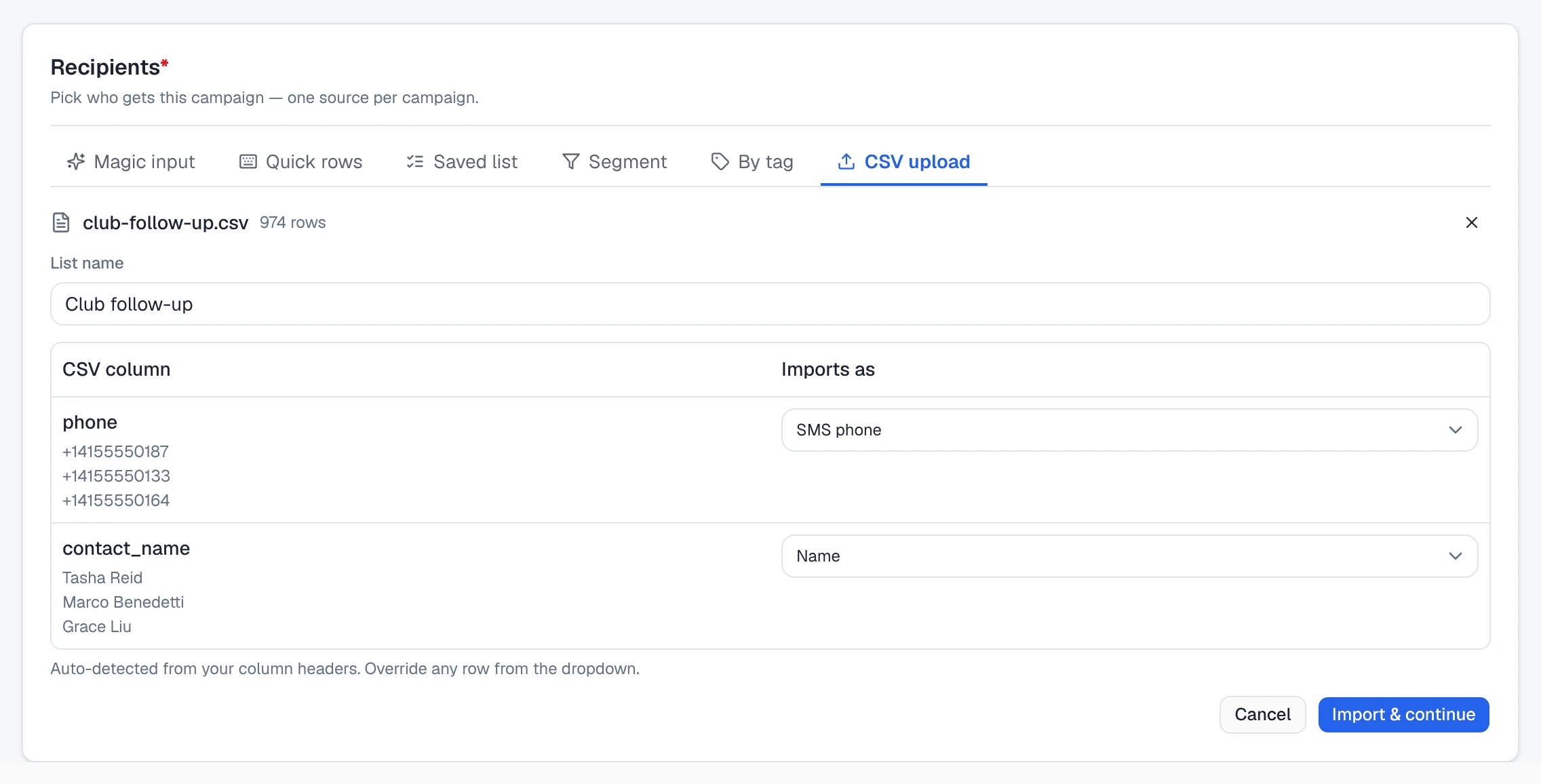
- It makes a list from the first campaign. The list holds the people the Club text was delivered to who did not click its link and did not reply: 974 of them. Anyone who texted STOP is always left out, on any of their numbers. The list is saved in /contacts as Club follow-up, so you can open it and see who is on it.
- It drafts the follow-up campaign to that list, with your new text and Track link clicks on. You get the same confirmation as any campaign Octo builds: how many people it goes to and what it costs. Nothing is sent until you press Send.
You can ask for other slices of the same campaign the same way: “everyone who clicked”, “everyone who replied”, or just “how many people didn’t click?”, which gives the count and makes no list. A few things to know:
- “Clicked” means what the campaign page means: at least one counted visit on that person’s tracked link. Asking about clicks only works on a campaign whose text carried a tracked link.
- It looks at the person, not one text. Someone the campaign texted on two numbers who clicked on either one counts as clicked.
- Up to 5,000 people per list. Octo tells you if more matched.
Give the first text a day or two before you follow up. Late clickers are the people you least want to send a second offer to.
From the report instead
The campaign’s Download report still exports one row per recipient
(phone, contact_name, status, replied_at, clicks, opted_out), if
you want to slice the audience in a spreadsheet yourself. Upload the rows you
keep as a new campaign’s audience with Recipients → CSV upload. The
columns are matched for you, and the file becomes a saved list.
Texts sent by a workflow
Some texts are better sent one at a time, when something happens to a contact, than as a campaign. A workflow can send a text as one of its steps.
Go to /workflows and use Build a workflow with Octo. Describe it in a sentence:
When a contact gets the
club-interestedtag, text them: “Thanks for asking about the Unlimited Wash Club at Bayside Express. First month $19.99, sign up at the pay station or at https://baysideexpresswash.com/club”
Now whoever is at the counter adds the tag in /contacts after a customer asks about the Club, and the text goes out on its own. Octo builds the workflow from steps the engine has, and you switch it on with Enable workflow.
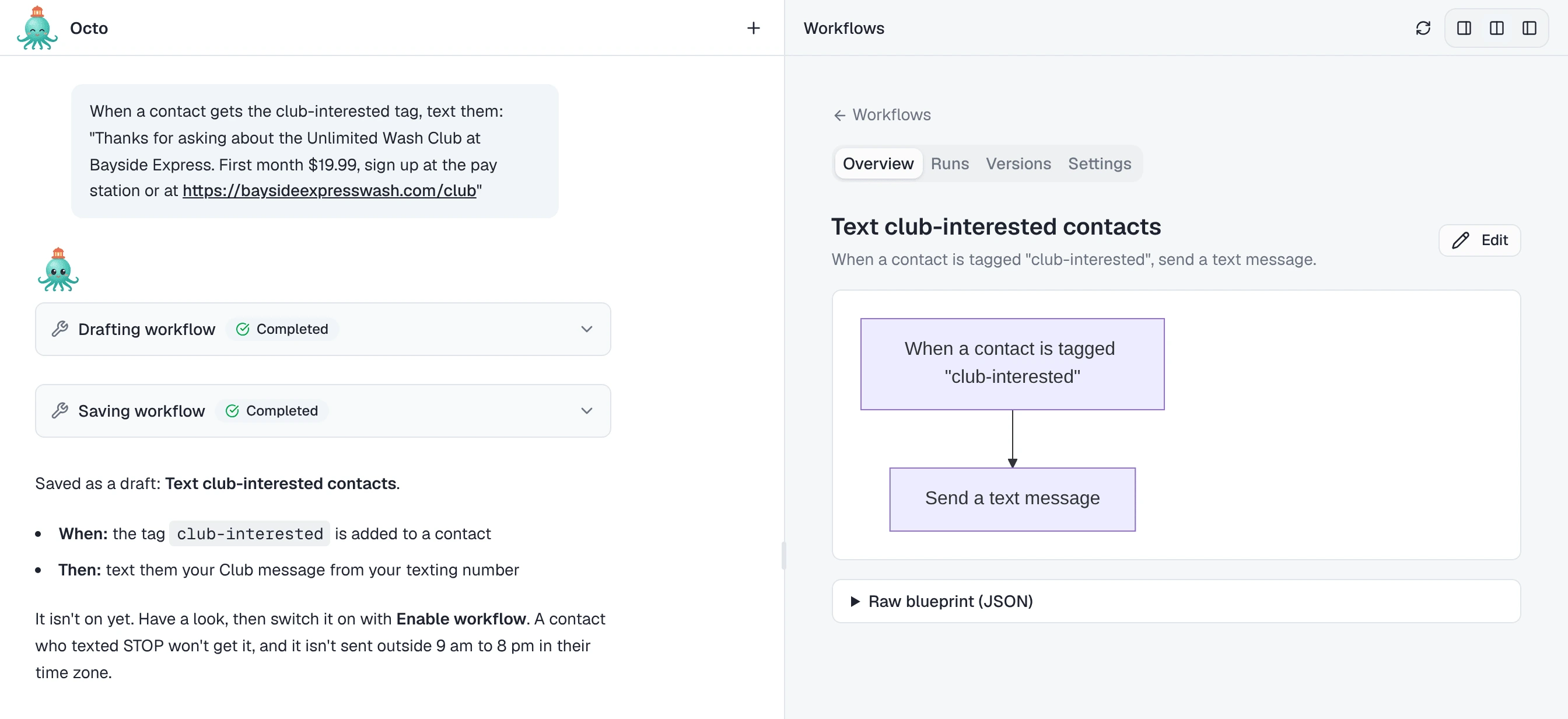
Two things to know:
- Links in workflow texts are not tracked. Click tracking is a campaign setting. A link in a workflow’s text is delivered as typed, and no click is recorded for it.
- Opt-outs and quiet hours still apply. A workflow text is not sent to a number that texted STOP. By default it is also not sent outside 9 am to 8 pm in the recipient’s time zone. A text that falls outside those hours is skipped, not held until morning.
Answer replies, photos included
A text that gets a reply is often worth more than a click. “Does the Club cover my second car?” is a sale waiting for an answer, and an answer at 9 pm on a Friday beats one on Monday morning.
Replies to a campaign land in Conversations, in the thread for your number and theirs, with the campaign text above them. An AI agent on that number can answer them as they come in.
Put an agent on the number
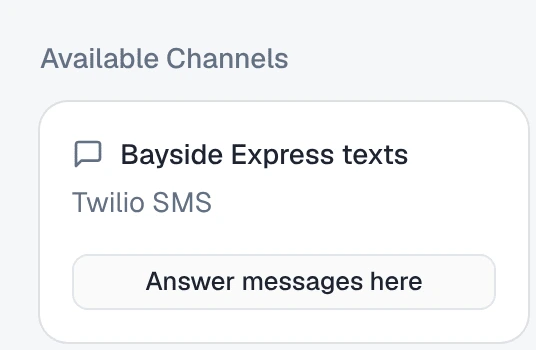
Open the agent from /agents, pick Channels, and find the number under Available Channels. Press Answer messages here. From then on, the agent answers texts to that number. A number with no agent says “Nobody answers this channel — messages are received and logged, but no agent replies”. The guide to putting an agent to work covers the Channels tab in full.
Give the agent the offer before the campaign goes out: the Club price, what it covers, how to sign up. The agent answers from what it knows, and its knowledge is where the details belong.
It reads the photos they send
People text pictures. A customer back from a road trip sends a photo of a mud-caked pickup and asks which wash will get it clean. Another sends a close-up of a mark on the door and asks whether a detail will take it out.
When a text arrives with a photo, the agent looks at it and answers in the same thread:
Customer: (photo of a muddy pickup) Which wash do I need for this?
Agent: That’s a lot of trail mud! The Ultimate wash includes the underbody rinse, which is what that truck needs. It’s included in the Unlimited Wash Club, $19.99 for your first month.
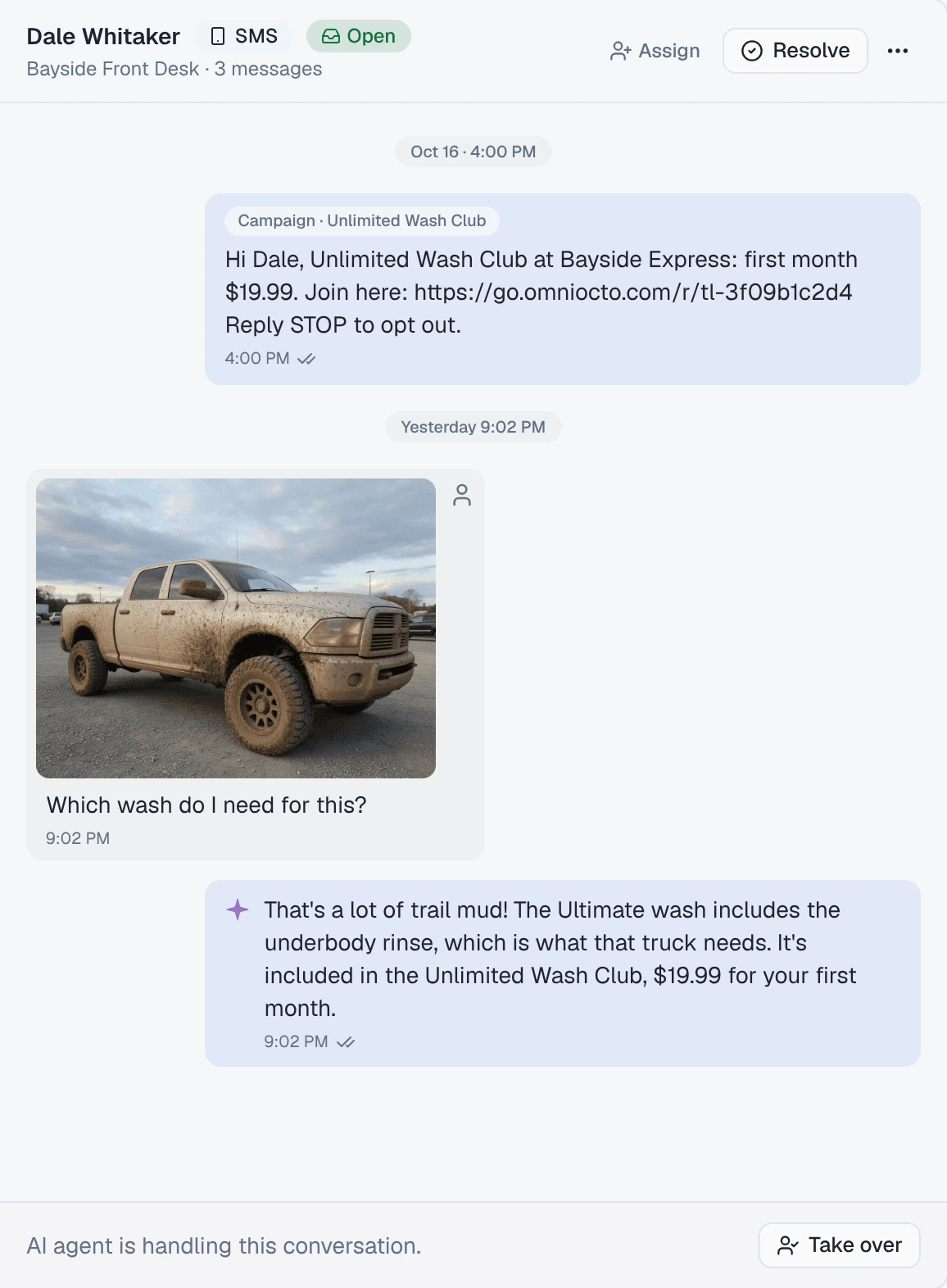
What the agent does with photos:
- JPEG, PNG, GIF and WebP pictures, up to 4 per message. A message with more photos than that is stored in full, and the agent sees the first four.
- It answers in a text. The photo is kept in the conversation, so you see what the customer sent next to what the agent said.
- It depends on the agent’s model. If the model cannot take images, or a photo is too large for it, the agent is told that a photo came in that it could not see, and answers from the words.
The reply goes out as a text from your number and is billed like any other. A customer’s text in is billed the same way: 2 credits per segment, or 4 per picture message, on an Omni Octo number. Received photos are kept for 180 days.
Write in the agent’s instructions what it should not do with a photo. For Bayside: never promise that a detail removes a scratch, and hand anything about damage to a person.
When a person should answer
Open the thread in Conversations and press Take over. The agent stops replying in that conversation, and you answer from the inbox. When you are done, Hand back to AI. Other threads are not affected while you have one of them.
A reply of STOP, START or one of the other keywords is handled as that keyword, and the agent does not answer it.
What it will not do
- Report an open rate. SMS has none.
- Track a link you didn’t write out with
https://, a link that comes from a contact field, or a fourth link in one message. - Track links in workflow texts. Only campaigns do.
- Count a link preview or a scanner as a click, or two clicks within 30 minutes as two visits.
- Read more than four photos in one message, or read a photo at all on a model that does not take images.