A connected bot receives messages. Whether anything answers them is a separate choice: you put an agent on the bot, or you leave it to your team. Either way, nothing customers send is lost.
Put an agent on the bot
Open the agent that should answer — Brightwater’s is Brightwater front desk — and go to its Channels tab.
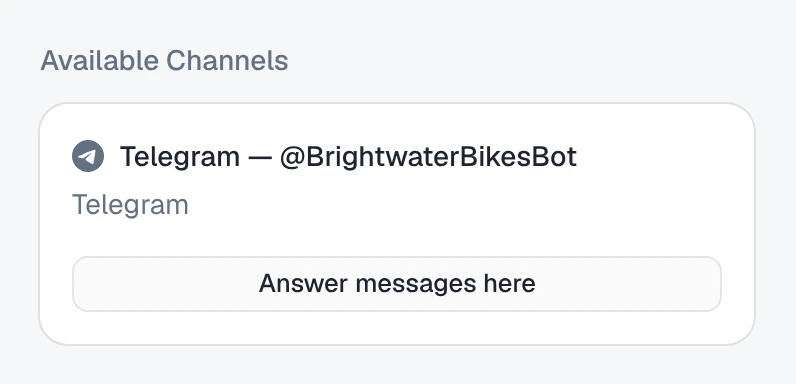
- Under Available Channels, find the bot’s card: the channel’s name, such as Telegram — @BrightwaterBikesBot.
- Press Answer messages here.
Deployed to Telegram — @BrightwaterBikesBot
The bot moves under Other channels, with an Answers row naming the agent. The next message a customer sends is answered by it.
Available Channels lists only channels that are Active. If your bot is not there, open it under /channels and check its status — connect your Telegram bot explains each one.
One agent answers a bot. If another agent already does, the card says ”… currently answers messages here” and its button is Take over messages. Pressing it asks you to confirm Replace inbound; the other agent stops answering this bot, and keeps every other channel it is on.
Everything else about the Channels tab — the rows, removing an agent, the on/off switch — is the same for every channel, and is in put it to work.
Or leave the bot to your team
A bot with no agent is a working inbox. Every message and every file still lands in /conversations, and the conversation says:
No AI agent replies here. Take over to answer.
On the agent’s Channels tab, the bot’s row reads Nobody — receive and log only. Use Assign there when you want an agent to start answering.
What pauses the agent in a chat
With an agent on the bot, it answers every customer, except in these cases. The customer’s messages still arrive in each of them; only the reply is held back.
| The agent in that chat | |
|---|---|
| Someone on your team took over the chat — pressed Take over, or replied from the inbox | Paused in that chat only. It comes back when someone presses Return to AI now, or on its own after a quiet spell if Return to AI automatically is on for the channel. Reply from the inbox covers both. |
| The agent is switched off | Answers nobody, on any channel, until it is switched back on. |
| The workspace is paused for billing | Answers nobody until billing is sorted out. |
Asking Octo instead
Put the Brightwater front desk agent on my Telegram bot.Octo puts it on, and asks first if another agent already answers there.
Where to go next
- Photos, voice notes and files on Telegram — what the agent does with what customers send.
- Reply from the inbox — take over a chat and hand it back.
- Teach it what to say and how to behave — the agent’s instructions, which apply on Telegram as everywhere else.