Some answers need a person. When Brightwater’s agent has told a customer that a bent rear wheel is usually a rebuild, the mechanic may want to look at the photos and quote a price himself. He does it from /conversations, and the customer gets his reply from the same bot, in the same Telegram chat.
Take over the chat
Open the conversation in /conversations and press Take over. The reply bar opens under the thread:
- type in Write a reply… — Enter sends, Shift+Enter starts a new line;
- or press Attach image or file, or drag a file onto the thread, or paste an image.
Press Send reply. The customer receives it from your bot, as if the bot had written it, and it shows in the thread as a reply from your team.
Sending a photo or a file
One file goes with each message, and the text you typed becomes its caption.
The bar takes images, PDFs, Word documents (.docx), MP4 videos and MP3 or OGG
audio. A photo arrives in Telegram as a photo, a video as a video, audio as
audio, and anything else as a file the customer can download.
Telegram fetches the file from Omni Octo to deliver it, and has its own limits on files sent that way:
Telegram’s Bot API documents a 5 MB limit for photos and 20 MB for other files sent by URL.
A file above Telegram’s limit is refused, and the message shows Failed to send. Send a smaller version, or a link.
The AI steps back while you answer
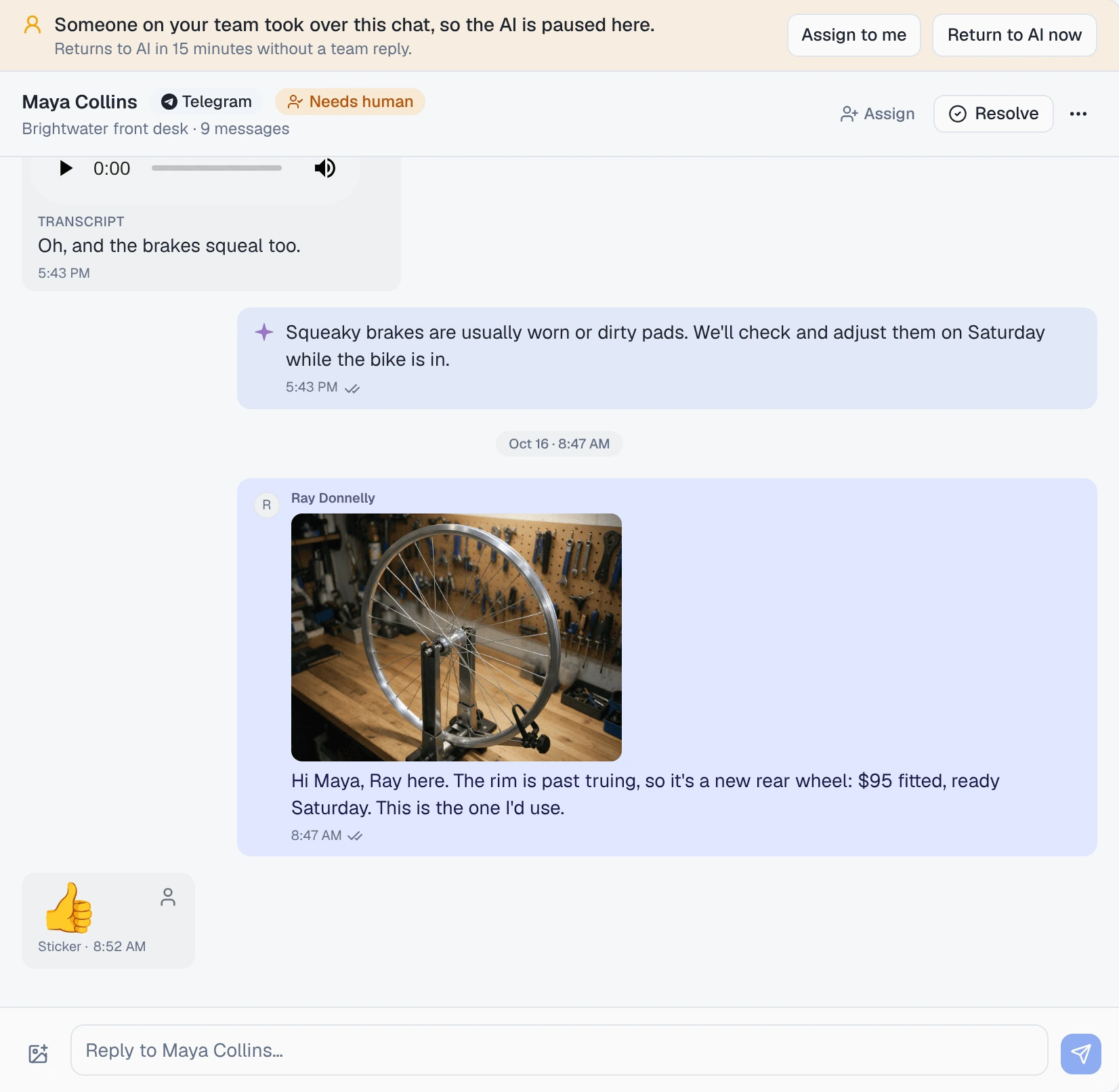
Taking over, or sending a reply, pauses the AI in that chat. The conversation’s status becomes Needs human, and a banner above the thread says:
Someone on your team took over this chat, so the AI is paused here.
It is paused in this chat only: every other customer keeps getting AI replies. It comes back in one of two ways:
- Return to AI now on the banner hands it back straight away.
- Return to AI automatically, if it is on for the channel, hands it back after a quiet spell, and the banner counts down: “Returns to AI in 15 minutes without a team reply.” Each reply from your team restarts the count.
Return to AI automatically is set on the channel’s page under /channels, from 10 to 60 minutes, or off. When it is off, the banner says so, and the chat stays with your team until someone hands it back. Everything about the banner and the setting is in hand a conversation back to the AI.
When the AI picks the chat back up, it reads your replies as said by the business, not by itself, so it carries on from what you promised.
What you cannot do on Telegram
- Start a conversation. A bot can only reply to people who have written to it, so there is no Telegram option under Compose. Customers have to message your bot first.
- Ask for a rating after the chat. Post-chat ratings are not available on Telegram yet; the channel’s page says “Post-chat ratings for Telegram are coming soon.”
When a reply does not go through
Telegram answers every send. If it refuses one — a file over its limit, a customer who blocked the bot — the reply bar shows the reason or Failed to send, and the message in the thread is marked Blocked. It is not retried on its own: fix the cause and send again.
Where to go next
- Photos, voice notes and files on Telegram — what customers can send, and how it shows in the thread.
- Hand a conversation back to the AI — the banner, Return to AI now and the automatic setting.
- Telegram bot not answering — when the bot goes quiet.