Bayside Express Car Wash has a customer list of 1,240 people and a weekend special to tell them about. What it does not have is a number that can text them. The phone number on the sign takes calls. A number bought online can usually receive texts. Neither one is allowed to send a business text to a list until the carriers have approved it.
This page covers how to get a number that can send texts. In Omni Octo that means the number shows Cleared to send under /phone-numbers. There are two ways to get there:
- Ask for one of ours. You answer five questions. The Omni Octo team registers a local or toll-free number with the carriers for you and emails you at each step. The registration costs a one-time $150.
- Bring your own Twilio number. If you already text from a Twilio account, import the number. Omni Octo reads its registration from Twilio and tells you whether it is ready.
Both paths take time, because the carriers set the pace. The last section covers what you can get ready in the meantime.
Why carriers make you register first
In the US, an ordinary ten-digit business number that sends texts through software is called a 10DLC number (ten-digit long code). The mobile carriers only deliver business texts from these numbers after the business has registered two things:
- A brand. Who you are: the business behind the number, which the carriers check is real.
- A campaign. What you will text and to whom: the kind of messages, and how the people on your list agreed to get them.
An unregistered number can still receive texts, so a customer who texts Bayside gets through. It cannot send business texts to a list. Omni Octo follows the same rule. A campaign will not start from a number until the carriers have approved it. The carrier rules don’t change if you send through a different tool.
The review is done by the carriers, not by Omni Octo. The app’s own estimate is the one it shows on a number in review: Carriers usually take 1–3 weeks.
Local, toll-free, or a short code
A 10DLC number is an ordinary local number. A toll-free number (800, 888, 877 and the like) can text too, and it goes through a similar check called toll-free verification: the carriers review who you are and what you will text before they deliver your business texts. Omni Octo treats both the same way. Either kind shows the same texting badge on /phone-numbers, and only Cleared to send can start a campaign. Once cleared, a 10DLC number sends up to 4 messages a second and a toll-free number up to 3.
When you ask for one of ours, you don’t pick the kind in the form. The team registers a local or a toll-free number for you, whichever suits what you told it. When you bring your own Twilio number, either kind works.
For very large volumes, ask us about a short code, a five- or six-digit number built for sending a lot of texts fast. Short codes are arranged with the team, not from a screen in the app.
Where to start
There are three ways in, and they all lead to the same place.
From the Showroom. Open /showroom and pick Text messages. If the workspace has no number that can text, the texting cards show Needed first: beside their button, with the link Get a number that can text. That link opens /phone-numbers. That page is where you request a number, import your own, and see each number’s texting state.
From Octo. Ask in the chat, or send the message a Showroom texting card puts in Octo’s box (Put this in my message). Before Octo starts a texting task, it looks at whether the workspace has a number that can text. If there is none, it first checks for a number request that is already open. If one is open, Octo gives you its status instead of starting a second request. If there is none, Octo explains in a sentence why a number has to come first and offers both routes below. You choose. Octo will not offer buying an ordinary number as a way to start texting, because a number bought that way cannot send texts until it is registered.
From the campaign editor. If you start a text campaign before you have a number, the Sender section says so: No SMS number yet (or None of your SMS numbers can send texts yet), “You need a number that’s registered for texting before you can send.”, and a Request an SMS number button. That button opens the request form on top of the editor, and your draft stays where it is.
Route 1: ask for one of ours
On /phone-numbers, press Request an SMS number. The button sits at the top of the page, and also on the empty page if the workspace has no numbers yet. Only a workspace owner or admin can send the request. Anyone else sees Ask a workspace owner or admin to request a number.
The form opens with one line of explanation: “Tell us a little about your business. Our team handles the carrier registration and emails you at each step.” Then it asks five questions.
| Question | What Bayside put |
|---|---|
| Your company website | Its homepage. “The carriers check that your business is real. A homepage is enough.” |
| Where will you send texts? | United States. The choices are United States, Canada, or Another country…, which opens a country list. |
| About how many texts a week? | 1,000 to 10,000: one text to 1,240 people most weekends. The other choices are Fewer than 1,000, 10,000 to 100,000, and More than 100,000. |
| What will you text people about? | Kind of texts: Offers and promotions. Then a sentence in its own words (below). |
| Who should we contact? | The owner’s name and email, and optionally a phone number. Every update goes to this email. |
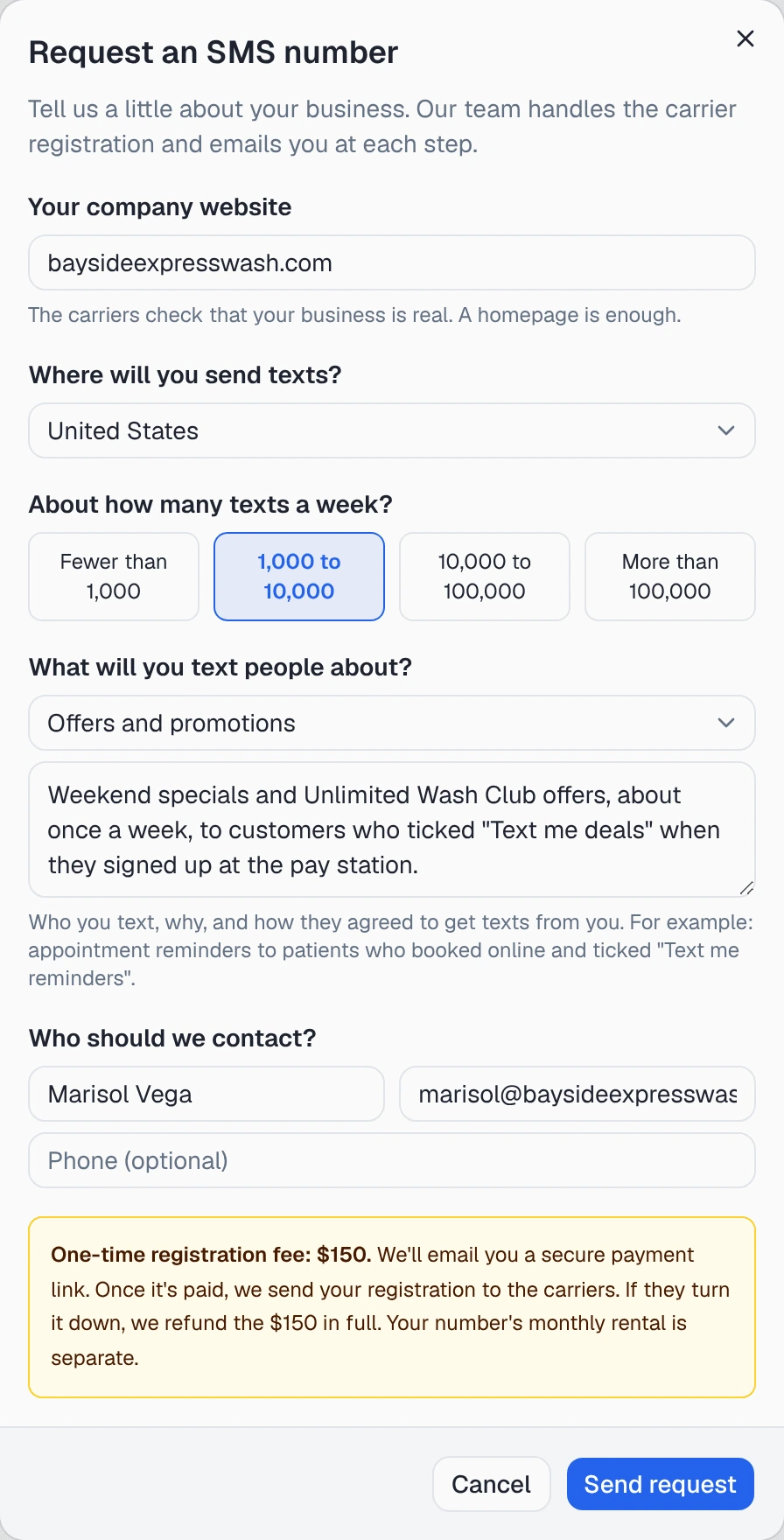
The fourth question is the one the carriers read most closely. The form asks for “Who you text, why, and how they agreed to get texts from you.” Its own example is “appointment reminders to patients who booked online and ticked ‘Text me reminders’”. It needs at least 20 characters and takes up to 1,000. Bayside wrote:
Weekend specials and Unlimited Wash Club offers, about once a week, to customers who ticked “Text me deals” when they signed up at the pay station.
The other kinds of texts on offer are Reminders and alerts, Replies to customers and Something else. Pick the one that matches what you will send. A registration for reminders is not a registration for promotions.
Above the button, the form states the fee: One-time registration fee: $150. “We’ll email you a secure payment link. Once it’s paid, we send your registration to the carriers.” Sending the form charges nothing. You pay through the link the team emails you, and the number’s monthly rental is separate.
Press Send request. A confirmation appears: Request sent. We’ve emailed you a copy. The email lists what you sent and says what happens next. To ask how it is going, reply to it.
If you have already asked for a number in that country, a second request is not created. Instead you see “You already asked for a number in United States. We’ll update you by email.”
Asking Octo instead
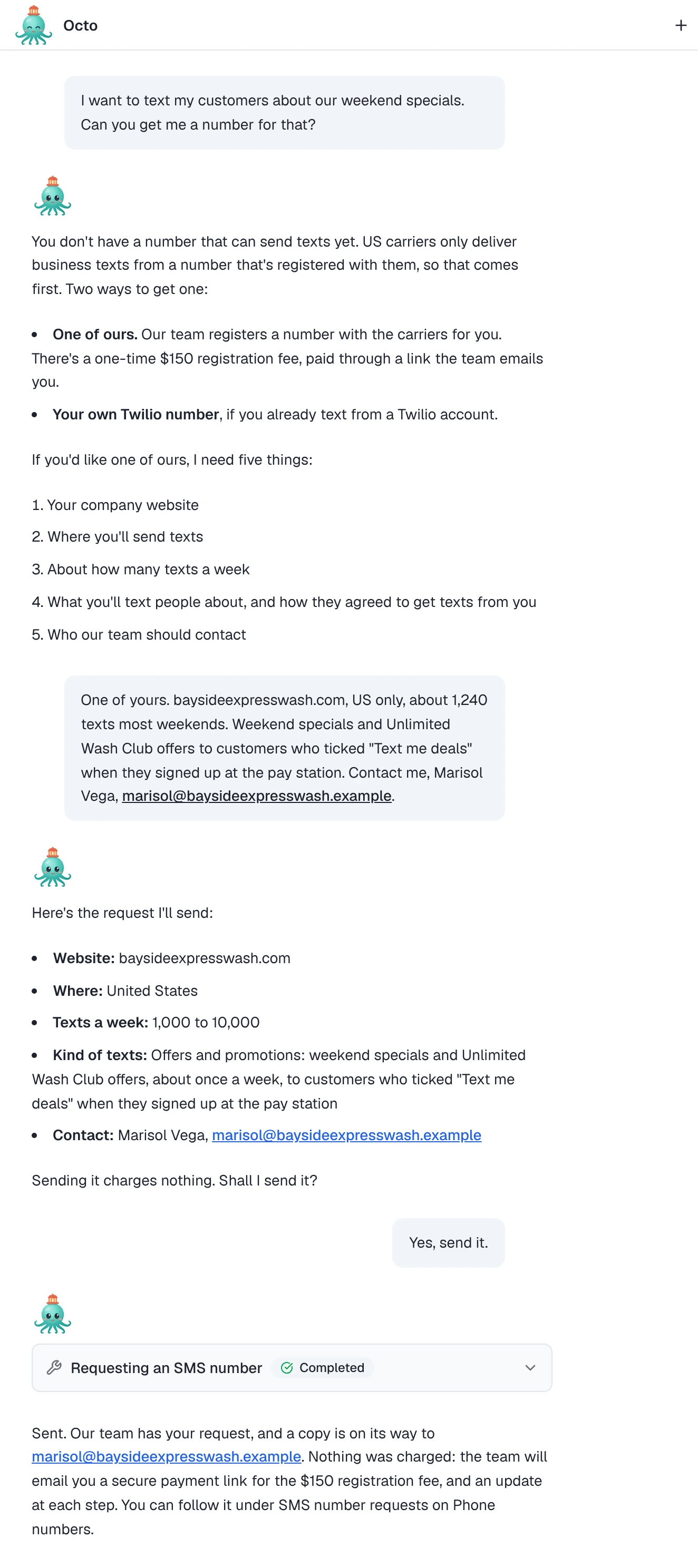
Octo can send the same request in the chat. It asks the same five questions, checks the answers with you, and sends the request only after you confirm. The rules are the same as on the form. Only an owner or admin can send it, nothing is charged, and the $150 is paid through the link the team emails. Octo will not tell you a payment was taken, and it will not guess how long the carriers will take. To check on a request later, ask Octo “How is my number request going?” and it reads the request’s current status.
Already bought a number here?
A number you bought with Buy a number takes calls and receives texts, but it shows Receiving only: “Receives texts. Register it for business texting to send.” Next to that state is a Request registration link. It opens the same form, filled in for that number, so the team registers the number you already have rather than getting you a new one. While the request is open, the number shows Requested · followed by the request’s status.
Following the request
While a request is open, or for 30 days after it closes, /phone-numbers shows a card titled SMS number requests, with the line We email you at each step. Each request moves through these states:
| Status | What is happening | What you can do |
|---|---|---|
| Request received | The team has your request. You have the confirmation email. | Edit or Cancel request |
| We’re in touch | ”Our team has been in touch by email, including the payment link for the $150 fee.” | Pay through the link. Edit or Cancel request still work. |
| With the carriers | The registration has gone to the carriers. You get an email when they answer. | To change it, reply to our email. The form is locked from here on. |
| Approved | The carriers said yes, and the team is finishing the last setup step on your number. | Wait for the number’s own state to change (below). |
| Ready to text | ”Your number is ready to send texts.” | Open Phone numbers or Start an SMS campaign |
| Turned down | The carriers rejected the registration, with their reason where there is one. | Request again, or reply to the email for help |
| Cancelled | The request was cancelled. | Ask again any time |

You can edit or cancel only before the registration goes to the carriers. After that, the team makes any changes, and you ask for them by replying to the email. The page does not show a timeline. The team emails you when the request goes to the carriers and when they answer, and when the number is ready the email links straight to /phone-numbers.
Route 2: bring your own Twilio number
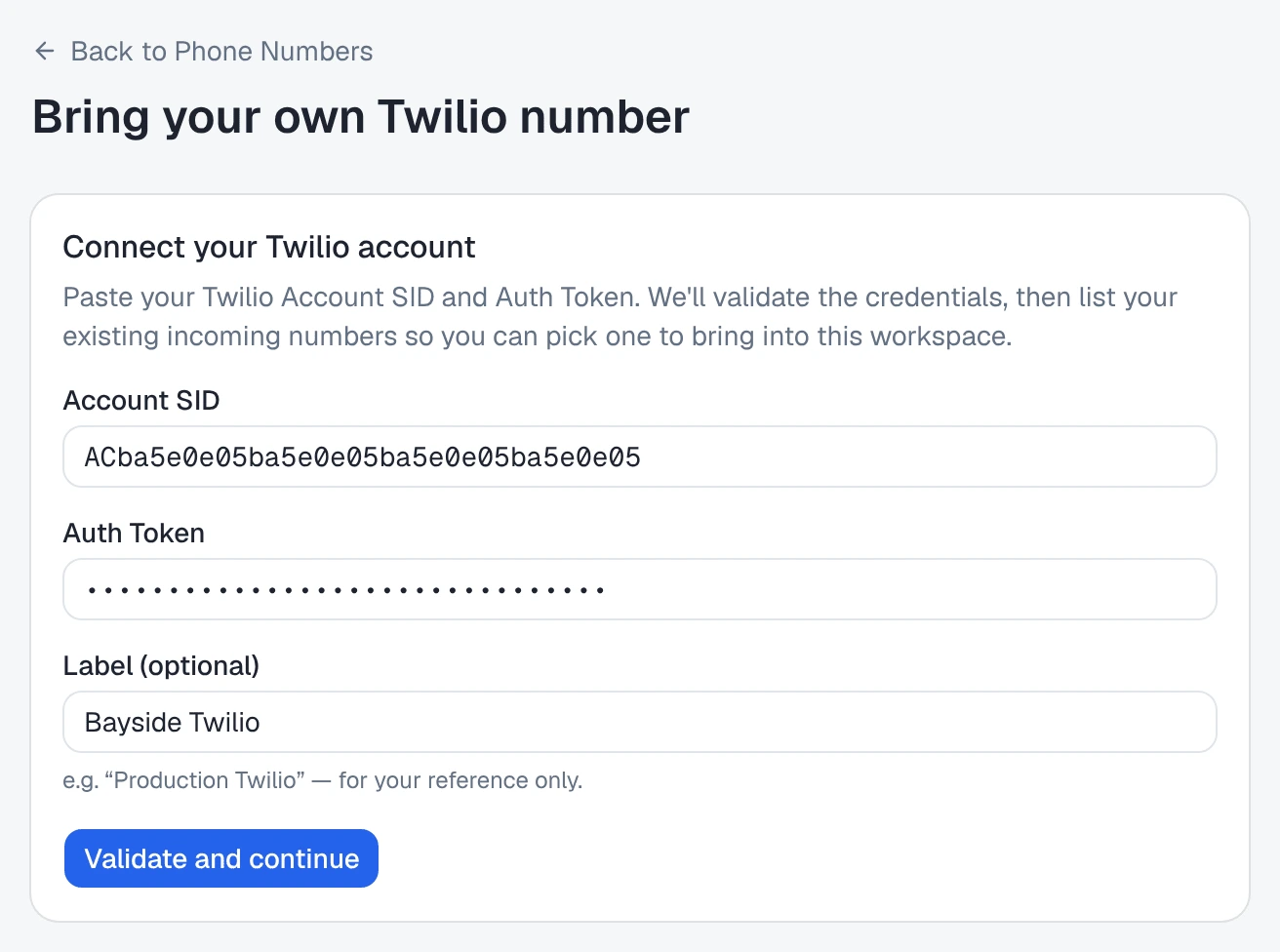
If Bayside already texted customers from a Twilio account, it can keep that number and its registration. On /phone-numbers, open Bring your own and choose via Twilio account (“You have numbers in your own Twilio account.”). The page is Bring your own Twilio number.

- Connect your Twilio account. Paste the Account SID and Auth Token, and optionally a Label, then press Validate and continue. If the workspace already has a Twilio account connected, you can pick Use the connected Twilio account instead of entering the credentials again.
- Pick a number. “These are the incoming numbers on your Twilio account. Select one to bring into this workspace.”
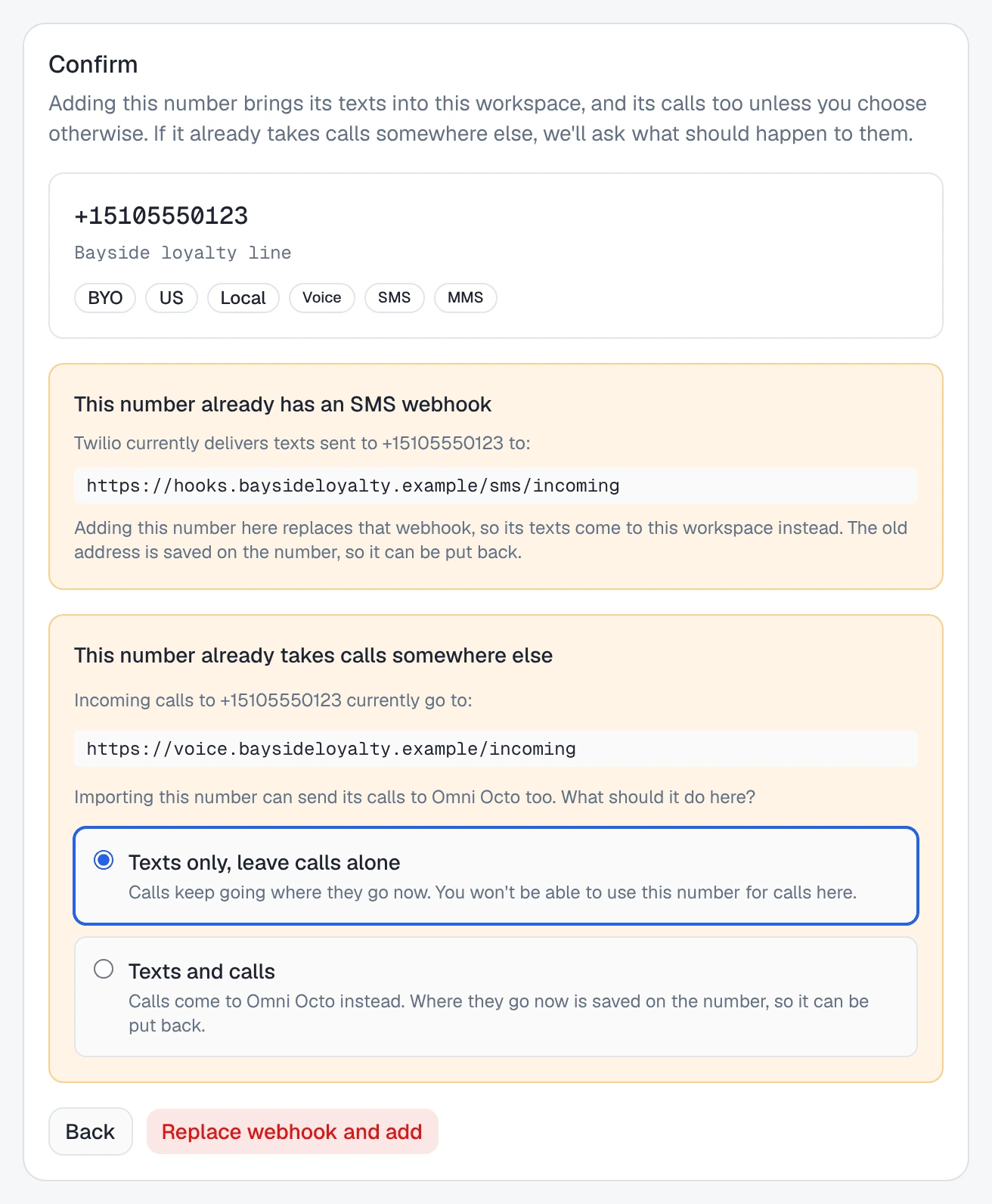
- Confirm, then Add to workspace. “Adding this number brings its texts into this workspace, and its calls too unless you choose otherwise.”
Importing a number can change two things in your Twilio setup, and the page asks you about both before it changes either:
- Texts already going elsewhere. If the number’s incoming texts go to another address, you see This number already has an SMS webhook. “Adding this number here replaces that webhook, so its texts come to this workspace instead. The old address is saved on the number, so it can be put back.”
- Calls already going elsewhere. If the number takes calls somewhere else, you choose Texts only, leave calls alone or Texts and calls. Bayside wanted the number for texting only, so it picked the first option, and its calls keep ringing where they rang before.
If Twilio says the number cannot send or receive texts at all, it is still added, but without texting: “This phone number can’t send or receive texts in Twilio, so we didn’t set up SMS for it.”
What Omni Octo checks
Omni Octo does not register a number you bring. That registration lives in your Twilio account, and you manage it there. A number from your own Twilio account cannot go through the Request an SMS number form either: “Only numbers you bought in Omni Octo can.”
What Omni Octo does is read the number’s registration status from Twilio. It does this when you import the number, again when you open the number’s page, and once a night. For a US 10DLC number it checks:
- Is the number in a Twilio Messaging Service? The 10DLC registration is attached to the service, not to the number itself. A number in no service has no registration, so it reads as Receiving only.
- Does that service have an approved campaign? Only an approved (verified) campaign clears the number. Being in a service is not enough on its own. A pending campaign reads as Registration in review. A failed, suspended or expired one, or a brand the carriers rejected, reads as Registration rejected, with Twilio’s reason where it gives one.
- Do the number’s replies reach Omni Octo? A Messaging Service can be set to take every incoming text itself, ignoring the number’s own setting. Then replies, and STOP requests, never reach your workspace. A number like that is not cleared, whatever its registration says (see Not receiving texts below).
A toll-free number is checked against Twilio’s toll-free verification instead, and it shows the same states.
The price
On your own Twilio number, Omni Octo charges 0.1 credit per segment, or per picture message, for each text sent or received. Twilio bills your Twilio account separately for the text itself. The campaign review says so before anything goes out: “You’re sending from your own Twilio number, so Twilio also charges your Twilio account for these messages.”
On one of our numbers, a text to or from the US or Canada costs 2 credits per segment and a picture message 4 credits, with no separate carrier bill.
What each texting state means
Every number that handles texts shows one badge on /phone-numbers and on the number’s own page. Below the badge is one sentence and at most one thing to do. The badge is the same one the campaign editor reads, so the two never disagree.
| Badge | What it means | What to do |
|---|---|---|
| Cleared to send | Registered and approved. The sentence names the kind of number and its sending rate, for example 10DLC · up to 4 msg/s. | Nothing. Campaigns can send from it. |
| Registration in review | The date it was submitted, then “Carriers usually take 1–3 weeks.” | Wait. Get the campaign ready meanwhile (below). |
| Receiving only | ”Receives texts. Register it for business texting to send.” | One of ours: Request registration. Your own Twilio number: How to register in Twilio, which opens Twilio’s guide. |
| Registration rejected | The carriers turned it down. The sentence is their reason, or “Carriers rejected the registration.” | Fix and resubmit. On your own Twilio number, you fix and resubmit in your Twilio account. |
| Not receiving texts | The number’s incoming texts go to a Twilio Messaging Service, not to Omni Octo, “so replies and STOP requests won’t reach you.” | Open Messaging Services in Twilio, then press Re-check on the number’s page (below). |
| Can’t check status | The last check with Twilio failed. A note shows the last status that is known: Check failed — showing last status: … | Retry. On the list it takes you to the number’s page, where the check runs again. |

Only Cleared to send can start a campaign. A campaign won’t start or resume, and a test text won’t go out, from a number in any other state. That includes Can’t check status, even if the last status known was cleared.
Fixing “Not receiving texts”
This one catches people who already use Twilio for something else. The app’s own instruction is: “Ask whoever manages that Messaging Service to set Integration to ‘Defer to sender’s webhook’. That changes it for every number in the service.” Omni Octo never changes the setting for you, because the same service may run your other products. Once the setting is changed, press Re-check on the number’s page and the badge updates.
Numbers on Telnyx or Vonage
A Telnyx or Vonage number can answer texts in Omni Octo, but today campaigns send only from Twilio numbers. Its registration is done in that carrier’s own account: “Register this number for business texting in your Telnyx account.”
Which route to choose
| One of ours | Your own Twilio number | |
|---|---|---|
| Who registers it | The Omni Octo team, from your five answers | You, in your Twilio account |
| Up front | $150 one-time registration, paid through an emailed link, plus the number’s monthly rental | Nothing to Omni Octo. Whatever Twilio charges to register, if you have not registered yet |
| Per text, US/CA | 2 credits per segment, 4 per picture message, sent or received | 0.1 credit per segment or message, plus Twilio’s charge to your account |
| How long | Carriers usually take 1–3 weeks once the registration is submitted | Immediate if the number is already registered. Otherwise the same carrier review |
| Questions go to | The team, by replying to the request email | Twilio |
For most businesses that have never texted, like Bayside, asking for one of ours is simpler. Someone who has done a registration before fills it in, and there is one bill. If you already text from a registered Twilio number, bring it. It can be cleared the moment the import finishes, and each text costs less on the Omni Octo side because Twilio bills you for the carrier part directly.
Both kinds are Twilio numbers, so both can run campaigns.
While you wait
Registration takes weeks. Whichever route you take, you can get everything else ready, because only starting the send needs a cleared number:
- Write the campaign. Create a text campaign in /campaigns and fill in the message, the recipients and the schedule. The draft saves as you type. In Sender, a number that is not ready shows (not yet approved). When you pick it, the editor says “The number must be cleared to send before this campaign can launch.” and links to Open the number’s registration.
- Build the list. Import the customers into /contacts, or set up a segment in /segments.
- Let Octo prepare it. Ask Octo to write the message or draft the campaign. Octo tells you where the number stands, prepares what can be prepared, and does not start a send from a number that is not cleared.
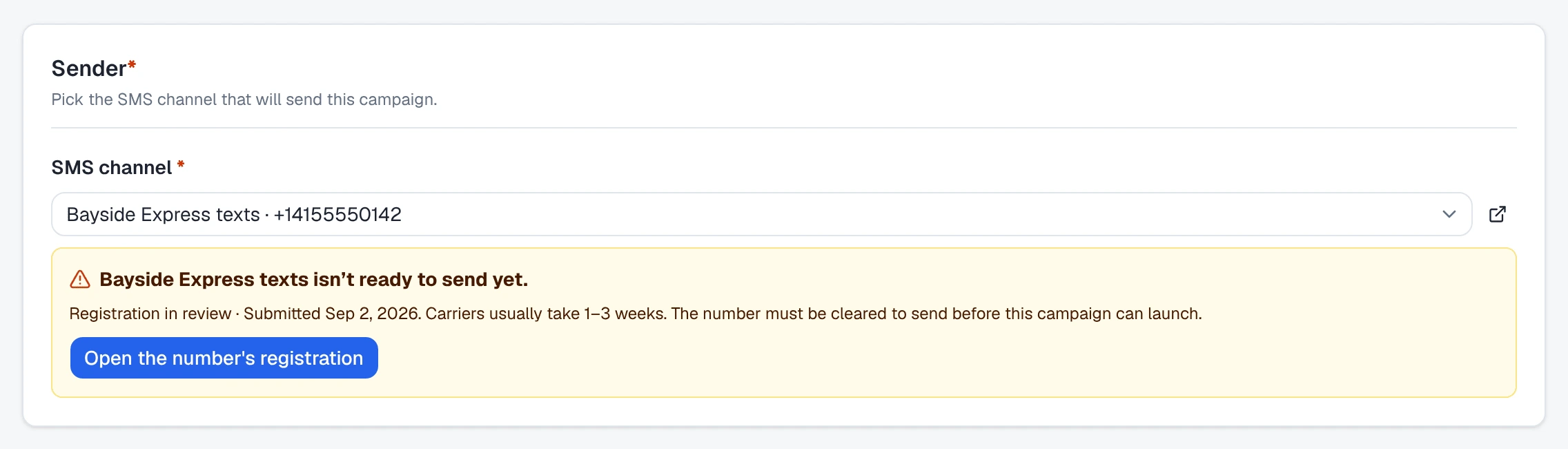
When the number turns Cleared to send, open the draft, pick the number in Sender, and go to review. The first guide in this set, on sending a mass text, covers that step.
Replies and STOP
Once the number is cleared, replies land in Conversations, in the thread
for your number and the customer’s. A customer who texts STOP is opted out of
texts from your whole workspace. They can opt back in by texting START, and
nobody on your team can opt them back in for them. The first guide in this set
covers both in detail. This is also why Not receiving texts blocks
campaigns: if a STOP cannot reach Omni Octo, it cannot be honoured.
What it will not do
- Send from a number the carriers have not approved. It will not start a campaign, resume one, or send a test from it.
- Register a number from your own Twilio account. That registration is yours, and you manage it in Twilio. Omni Octo reads it and shows the result.
- Change your Twilio Messaging Service. It tells you which setting to change. You change it.
- Charge the registration fee in the app. Sending the request charges nothing. The $150 is paid through the link the team emails.
- Promise a date. The carriers decide. The app gives their usual range, 1–3 weeks, and emails you when they answer.
- Run campaigns from a Telnyx or Vonage number, for now.