Customers on Telegram rarely describe a problem in words when they can show it. They send three photos and a question, hold the microphone and talk for twenty seconds, or record one of Telegram’s round video messages. Your AI agent takes all of it in, answers once, and keeps every file in /conversations for your team.
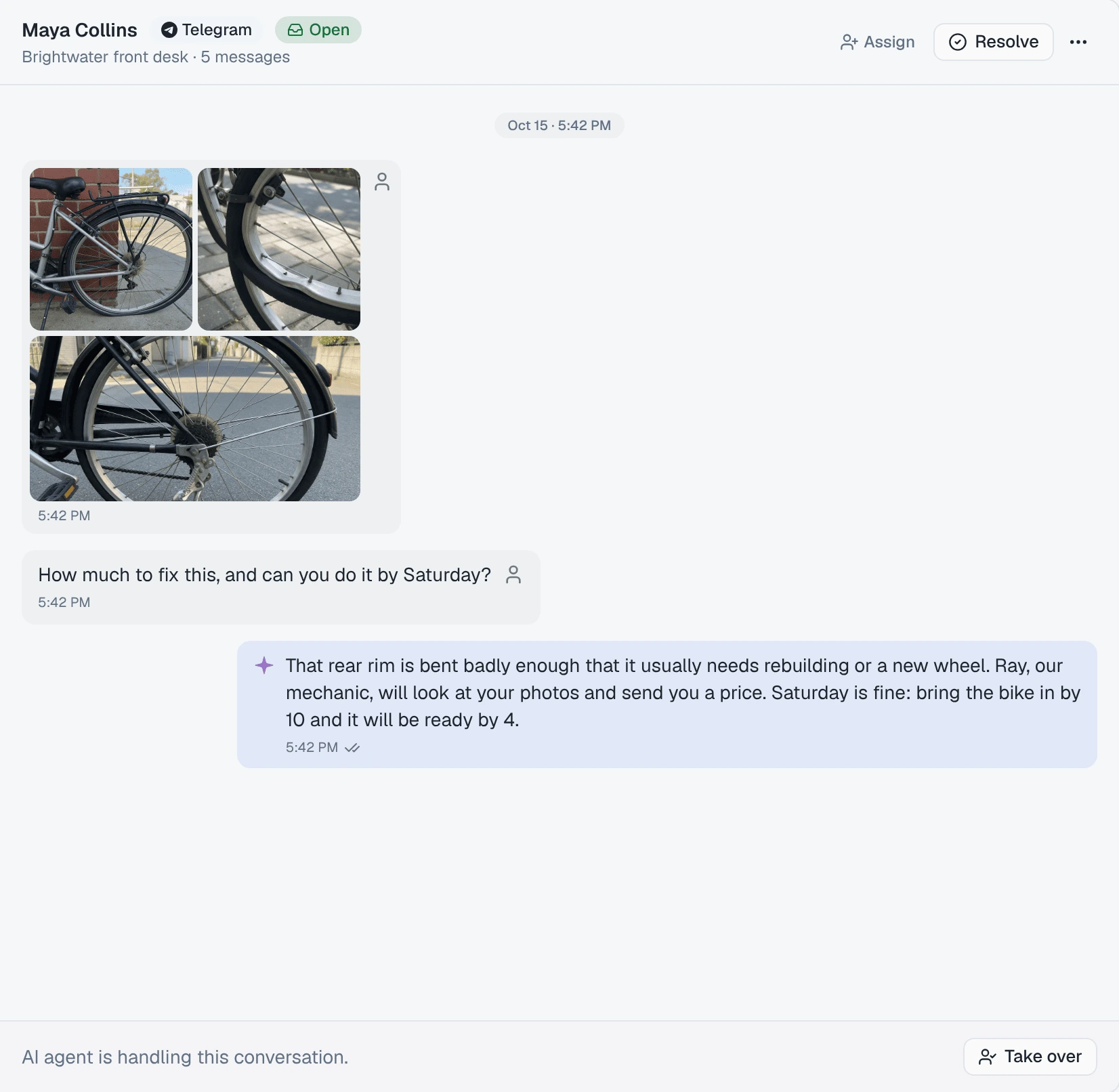
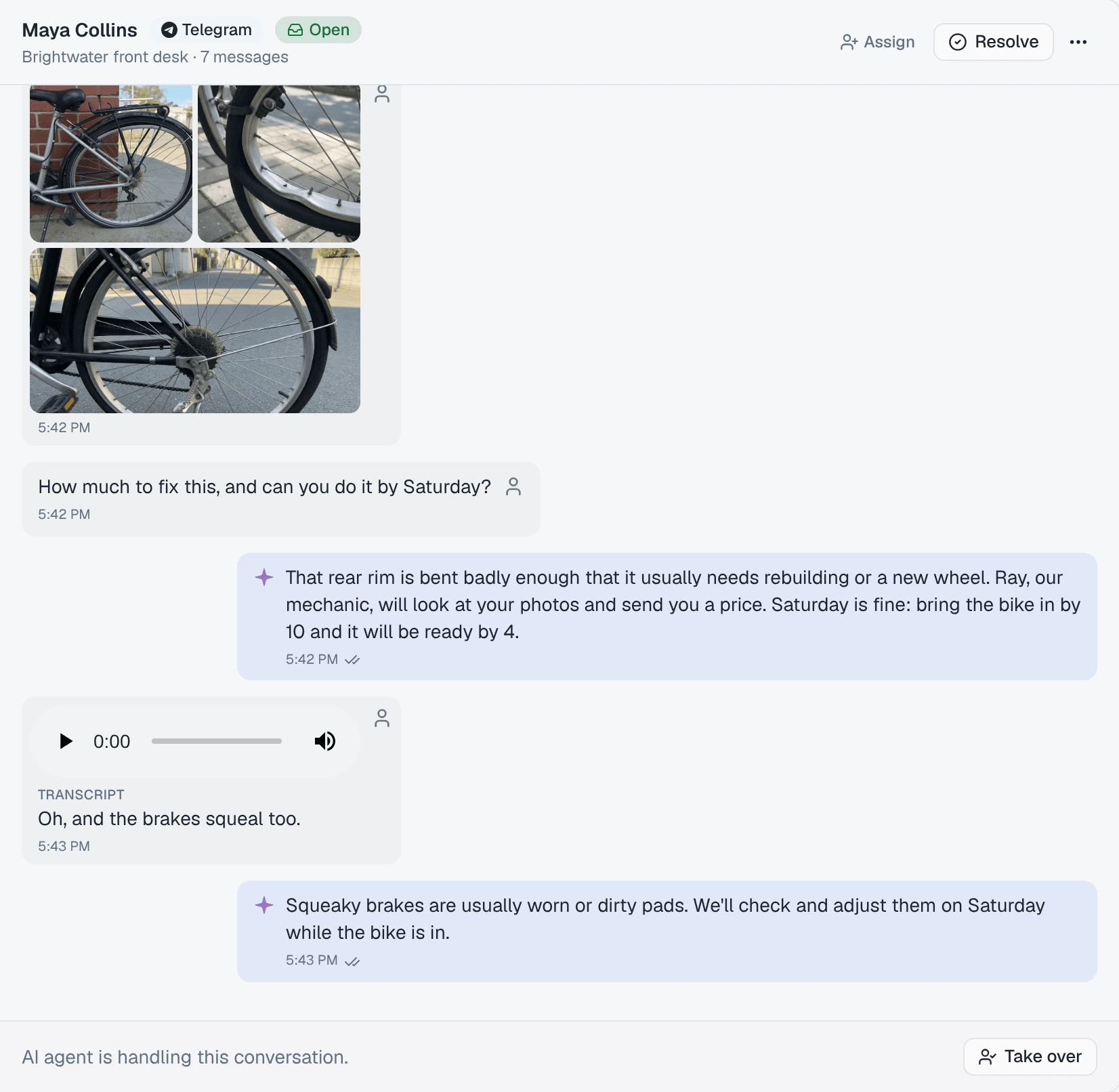
Take Brightwater Bike Repair. A customer messages the shop’s Telegram bot: three photos of a bent rear wheel, then “how much to fix this, and can you do it by Saturday?”. A minute later, a voice message: “oh, and the brakes squeal too.” The agent answers the photos and the question in one reply, then answers the brakes. The mechanic opening the conversation in the morning sees the photos, can play the voice message, and reads what was said in it.
One answer to an album and its question
Telegram delivers an album as one message per photo, and the question typed with it as one more. Answering each as it arrived would mean four replies, three of them to photos with no question yet.
So when a message carries a photo or a file, the agent waits until no new message has arrived for 5 seconds, then answers everything that came in, together. It never waits more than 20 seconds from the first message, however long the customer keeps sending.
- Plain text is answered straight away. The wait applies only when a photo or a file is part of what came in.
- Up to 20 messages are answered together. A customer who sends two full albums of 10 photos and then a question gets two answers.
- A message sent while the agent is already writing is not added to that answer. It gets its own, once the first has gone out, so the agent never answers two things at the same moment in one chat.
What the agent does with each thing a customer sends
| The customer sends | The agent |
|---|---|
| A photo, or an album | Sees it. Up to 10 photos per answer, in the order they were sent, so it can talk about “the third photo”. |
| A voice message, or an audio file | Reads a transcript of what was said, and answers that. |
| A round video message | Reads a transcript of what was said. It does not see the picture. |
| A video | Knows a video arrived. It cannot watch it, and says so rather than guessing what is in it. |
| A GIF | Knows a GIF arrived. It cannot watch it. |
| A sticker | Sees the sticker’s emoji, so a 👍 sticker reads as a thumbs-up. |
| A document — a PDF, a spreadsheet, a Word file | Knows a document arrived, and its name. It cannot open it. |
The last row is the one to plan for. An agent that is told “here is my invoice, check the total” will say it cannot open the file, not invent a total. If your customers send documents your agent should read, tell it in its instructions what to say instead — ask for the figure in a message, or say a person will look at it.
Earlier files are remembered as having been sent. On the customer’s next message, the agent knows that earlier in the chat they sent a photo, a video message or a 👍 sticker, and what it replied to them. It does not see those photos again.
Where every file ends up
Open the conversation in /conversations. Every file the customer sent sits in the thread where they sent it:
- Photos in a grid, one tile per photo. Click one to open it full size.
- A voice message with a player, and its Transcript under it.
- A round video message in a square player, with its transcript under it.
- A GIF playing on a loop without sound, with a Pause GIF button that is always on it. If your computer is set to reduce motion, GIFs start paused.
- A sticker as its emoji, large. In the conversation list, the preview says Sticker 👍.
- A video with a player, and a document as a chip with its name and size; click it to open the file in a new tab.
A file that could not be saved shows a line in its place — Photo not available, Voice message not available, Document not available — so you know something was sent even when it cannot be shown.
Things worth knowing
- Files over 16 MB are not saved. The customer’s message still arrives, with the line for the file in its place, and the agent is told it could not load it.
- Files are kept for 180 days, then deleted. The messages, and what the transcripts said, stay.
- An edited message is not answered again. If a customer edits a message after sending it, the agent answers the original and the inbox shows the original.
- A bot with no agent still keeps everything. If no agent is set to answer on the bot, every message and file still lands in /conversations for a person to answer — put an agent on your bot covers both.
Where to go next
- Put an agent on your bot — choose which agent answers, or leave it to your team.
- Reply from the inbox — take over a chat, answer with your own photos, and hand it back to the AI.
- Teach it what to say and how to behave — where to tell the agent what to do with documents it cannot open.